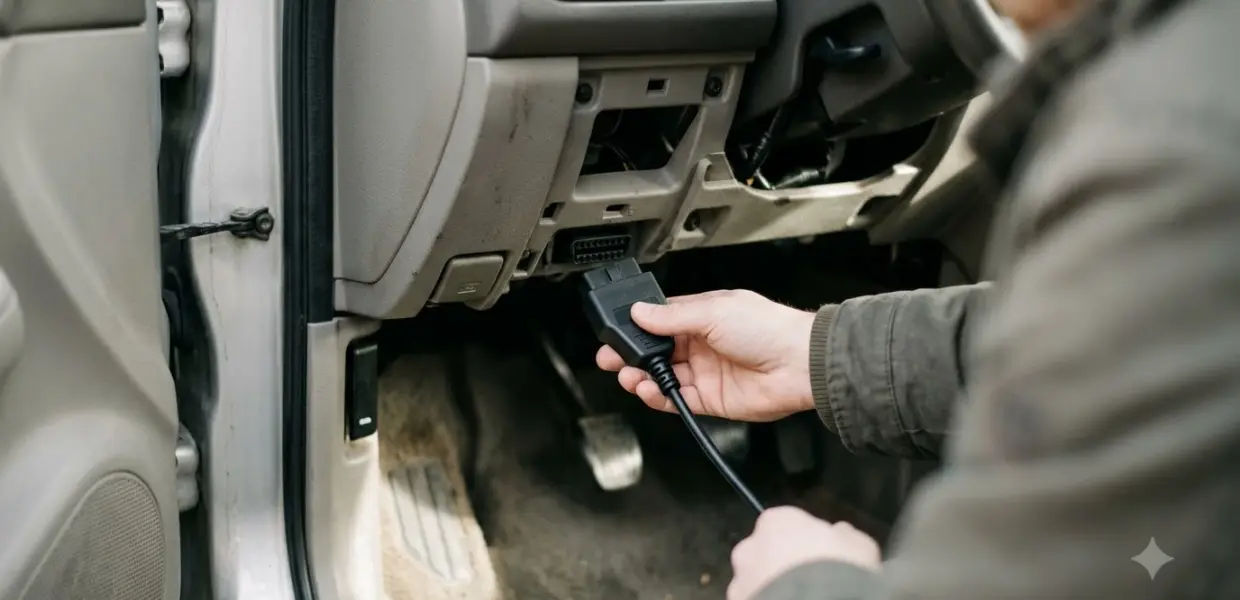

Learning how to use Autel MaxiScan MS309 starts with the ignition off, the cable in the 16-pin port, and the ignition on before you read anything. The tool takes its power from the vehicle through that port, so no separate battery is needed.
The manual’s order matters. Read the codes and check freeze frame first, then decide whether an erase is safe. Erasing removes stored data, so the order is the one thing you cannot reverse.
What the Autel MaxiScan MS309 Covers
The Autel MaxiScan MS309 product page says the tool is compatible with domestic, Asian and European vehicles from 1996 and newer. Autel lists four functions: reading generic, manufacturer-specific and pending codes, erasing codes, viewing freeze frame data, and displaying I/M readiness status.

Before you start, the manual adds a check for older cars, since the MS309 only works on OBD II vehicles. It says a small number of 1994 and 1995 gasoline vehicles are OBD II compliant. The Vehicle Emission Control Information label under the hood or by the radiator will say “OBD II Certified” if yours is one. A compliant car must also have a 16-pin Data Link Connector under the dash.
- 1996 and newer US cars: OBD II is required, and the 16-pin port should be present.
- 1994 and 1995 cars: check the emissions label before you buy or plug in.
- Domestic, Asian and European models: the manual lists all three as covered.
How to Use Autel MaxiScan MS309: Plug In and Power Up
The first step in how to use Autel MaxiScan MS309 is the power connection. The manual says the tool is powered through the vehicle’s Data Link Connector, which is the 16-pin port under the dashboard. Some vehicles have a plastic cover over that port, so remove it before you plug in. As a basic safety rule, do not connect or disconnect the tool while the ignition is on or the engine is running.
- Turn the ignition off and locate the 16-pin Data Link Connector under the dash.
- Remove the plastic DLC cover if your vehicle has one.
- Plug the OBD II cable into the DLC until it seats.
- Turn the ignition on. The engine can be off or running.
- Wait for the protocol messages to finish, then press Enter to open the Diagnostic Menu.
If the screen shows a LINKING ERROR, the manual lists four checks: the ignition is on, the cable is securely connected, the vehicle is OBD II compliant, and the ignition has been cycled. Turn the ignition off, wait about 10 seconds, turn it back on and repeat from the protocol step. If the message stays, contact the distributor or the manufacturer’s customer service.
How to Use Autel MaxiScan MS309 to Read Codes
From the Diagnostic Menu, use the scroll button to select Read Codes and press Enter. The tool shows each stored code with its definition on the screen. Read the codes and write them down before you do anything else in how to use Autel MaxiScan MS309.
- Select Read Codes from the Diagnostic Menu.
- If more than one control module is found, choose the module from the list. The manual names the Powertrain Control Module and the Transmission Control Module as the usual choices.
- Scroll through each code and its definition, and note the count shown in the upper corner.
- If the screen says no codes are stored in the module, the computer has no stored codes at that time.
The display marks pending codes with Pd, and manufacturer-specific codes are labeled as such. Pending codes are faults the computer has seen but not confirmed, so they are worth recording even if the light is off. That makes pending codes one of the quickest wins when you learn how to use Autel MaxiScan MS309.
Steady vs flashing
The manual says a steady warning light means a problem was detected and the vehicle should be serviced as soon as possible. A flashing light is a severe problem, and the system is designed to discourage driving the vehicle. Those two patterns change what you do next. Our guide to a flashing check engine light explains why a blinking light is more urgent.
Because the MS309 reads the codes but does not repair anything, treat each code as a lead, not a diagnosis. Compare the code with the freeze frame data before you buy parts. Pairing the two is the habit that makes how to use Autel MaxiScan MS309 worthwhile for a home mechanic.

How to Use Autel MaxiScan MS309: Freeze Frame Before Erasing
Freeze frame data is a snapshot of engine values recorded when an emissions fault sets. The manual lists engine RPM, vehicle speed, air flow, engine load, fuel pressure, fuel trim, coolant temperature, and ignition timing among the values it can include.
- Select View Freeze Frame from the Diagnostic Menu and press Enter.
- Choose the control module if the tool asks you to.
- Wait while the tool validates the PID map, then scroll through the screens.
- Write down the values. If the screen says no freeze frame data is stored, there is nothing to record.
Freeze frame shows the conditions at the time of the fault, such as speed and temperature. Those values show the conditions when the fault set, which helps when a fault only appears under certain driving conditions. Freeze frame is the step in how to use Autel MaxiScan MS309 that people most often skip.
How to Use Autel MaxiScan MS309: Check Readiness Before Inspection
The I/M readiness function checks whether each emissions monitor has completed its test. The manual says it is useful before a state emissions inspection, because a monitor that is not finished can cause a fail.
- OK: the monitor has finished its diagnostic test.
- INC: the monitor has not finished its test yet.
- N/A: the monitor is not supported on that vehicle.
The manual notes that an INC result does not necessarily mean the car will fail, because some states allow one or more monitors to be not ready. Check your state’s rules before you assume a fail. Some newer models show two types of readiness, since DTCs cleared and this drive cycle.
Readiness checks are a practical part of how to use Autel MaxiScan MS309 before an inspection. Readiness comes back only after the car is driven under a mix of highway and city conditions, with at least one overnight-off period. The exact drive cycle varies by monitor, so the owner’s manual for the car is the place to confirm it.
Erase Only After the Repair
The erase option is the last step in how to use Autel MaxiScan MS309. It turns off the Check Engine light and clears the codes, but the manual warns that it also deletes freeze frame and manufacturer-enhanced data. It also resets every readiness monitor to Not Ready or Not Complete. Do not erase until a technician has checked the system completely, or until the repair is finished.
- Confirm the codes and freeze frame are written down.
- Turn the ignition on with the engine off. The manual says erasing is done key on, engine off, and the engine should not be started.
- Select Erase Codes and confirm the warning when it appears.
- Look for the Erase Done message. If the screen shows Erase Failure, turn the key on with the engine off and try again.
After an erase, the readiness monitors need a drive cycle before they report OK again. If you need an inspection soon, plan for several days of normal driving before you test. Erasing does not fix the fault, so if the same code returns, the cause still needs a repair. Keep that in mind when you plan how to use Autel MaxiScan MS309 before a state inspection. If your goal is tire pressure sensor work rather than engine codes, see the Autel TS508WF TPMS tool guide.
Related Guides
Frequently Asked Questions
Does the MS309 work on a 1995 car?
Only if the car is OBD II certified. The emissions label under the hood or by the radiator will say so, and the manual says some 1994 and 1995 gasoline cars are compliant.
What does LINKING ERROR mean?
The tool cannot communicate with the car’s computer. Check that the ignition is on and the cable is seated, then turn the ignition off, wait about 10 seconds, and try again.
Will erasing the code fix the car?
No. Erasing does not change the fault: the code and freeze frame are deleted, and the light returns if the fault is still present. Record the codes first so a technician can use them.
How long until readiness shows OK?
The manual says the monitors need a drive cycle with a mix of highway and city driving and at least one overnight-off period. The exact cycle varies by monitor and by vehicle.
Is it hard to learn how to use Autel MaxiScan MS309?
No. The Diagnostic Menu has a short list of options: Read Codes, View Freeze Frame, I/M Readiness and Erase Codes. Read the codes first, and use the other options only when you need them.
Can the MS309 show pending codes?
Yes. The display marks pending codes with Pd, and they are worth recording even when the warning light is off.
Knowing how to use Autel MaxiScan MS309 safely means reading the codes and recording freeze frame before you use the erase option. A steady warning means a service visit soon, and a flashing one means stop driving. If you are still learning how to use Autel MaxiScan MS309, keep the manual’s menu list nearby.